We recommend that you always use the latest version of your browser.
eTreatment

Depression - eTreatment

Depression is one of the most common mental health disorders. It is characterized by intense and persistent low mood. Depression reduces your interest in things you usually like and enjoy. This often leads to a loss of energy, making it difficult to function in everyday life.

What is eTreatment?

With eTreatment, you get access to an evidence-based treatment program via PC, tablet or mobile phone, while being followed up by a specialist healthcare provider. This is a form of online treatment with professional guidance.

Read more about eTreatment at helsenorge.no.

Content of eTreatment for depression

Hendene til en person som bruker en bærbar datamaskin, og skjermen med bilder fra eBehandlingsprogrammet
The eTreatment program

The program is based on cognitive behavioural therapy, a form of therapy that focuses on how thoughts and actions affect how we feel. The aim is to help you understand what contributes to depression and how you can work your way out of it. You will learn to recognize and change thought patterns, and to change how you act so that you can feel better.

The content of eTreatment is much the same as what you receive in face-to-face treatment. Research shows that this type of treatment can be just as effective.

Referral and assessment

How can I access eTreatment for depression?

  • If you are already receiving treatment at your local District Psychiatric Centre (DPS), we would like you to apply in consultation with your therapist.
  • If you are not receiving treatment for mental health difficulties, you can contact your GP and ask them to refer you to us. Ask your doctor to state in the referral that you would like eTreatment. Other doctors or psychologists can also refer you.

In some parts of Norway, you can apply for eTreatment via Helsenorge (scroll down to the bottom of the page).

Response to your referral

You will receive a response from eTreatment by letter or at helsenorge.no. You will receive an SMS notification on your phone when the response is available on Helsenorge. The response will tell you about the assessment, what happens next, and your rights.

Response to your referral

You will receive a response from eTreatment by letter or at helsenorge.no. You will be notified by SMS on your phone when the response is available on Helsenorge. The response will tell you about the assessment, what happens next and your rights. If we assess that the treatment is not relevant for you, we will recommend that you contact the person who referred you or look for other treatment options. In either case, your GP will be informed that you have been in contact with us.

Before

If we conclude that you could benefit from eTreatment, you will be invited to an assessment appointment. The appointment can take place by video consultation or in person. You will receive more information about this in the response letter.

Before the assessment appointment

We recommend that you read the first chapter ofeTreatment for depression.

During the assessment appointment

You will meet with a therapist from eTreatment. The therapist will assess your difficulties and life situation together with you. You can also ask questions about eTreatment. Together, you will assess whether eTreatment is a suitable option for you.

During

The treatment

If you decide that the program is right for you, you can start treatment the same day. You will be sent information about how to log in, and you can log in to eTreatment using your BankID.

eTreatment is delivered in stages. When you have completed one chapter, you will get access to the next one. The most important part of the treatment is practising the exercises you are given. The exercises do not take place within the digital program, but are tasks you practise in your everyday life.

The treatment for depression includes:

  • information about depression
  • how to get started with new everyday routines
  • how to manage negative thoughts
  • challenges with getting started on new routines about anxiety
  • how to manage stress in life
  • about loneliness and self-esteem
  • how to maintain change and make a plan for the future
Bilde av skjermen til appen for eBehandling


Working with your therapist

Your therapist will follow up with you every week through written messages in the program. You can write to your therapist whenever it suits you—for example, about how the exercises have gone and what you have been thinking about. You can also ask questions.

Your therapist will read what you write, give you feedback and support you as you work through the treatment. The aim is to work together towards what matters to you and help you achieve your goals.


Bilde av skjermen til appen for eBehandling


Involve those closest to you

It may be very helpful to tell, and perhaps show, those closest to you what you are working on in treatment. We have found that people who involve family members or a close friend in their treatment may find it easier to work through their challenges.

After

When you have completed treatment, you will be offered an appointment with your therapist. After this meeting, treatment will end, but you will have read-only access to all the content for 6 months.

Last professionally updated 14.11.2025

Contact

  • Contact the Department of Addiction Treatment (ARA)

    Kongsgård alle 71

    Kongsgård alle 71

    Kongsgård alle 71, 4632 Kristiansand

    Transport

    You can reach our locations by public transport. Visit Agder kollektivtrafikk to find your route:akt.no

    You may be entitled to reimbursement for necessary expenses when travelling to and from your treatment location.

    As a general rule, you should use public transport, and you must pay a deductible. To be reimbursed for the travel expenses you have paid, you must complete a travel expense claim form and send it toPatient travel.

    Practical information

    Does your appointment not suit you? If you receive your appointment letter digitally on helsenorge.no, you can now send a direct message to the department you are going to if you need a new appointment time. You must be a registered user of helsenorge to access this service.
    You can also contact the department where you have an appointment or call the switchboard on: 38 07 30 00
    ​

    Children and young people are affected when someone in the family is ill, and they need to understand what is happening. You may be a patient, a relative, or a parent of sick children who have siblings. We at the hospital will help ensure that the children and young people in your family are well cared for.

    Children as relatives


    Visiting hours may vary between departments and locations. Please check with the department where you have an appointment for more information.

    See an overview of the hospital departments

    General visiting hours:

    Arendal:
    17:00–19:00 on weekdays
    14:00–16:00 and 18:00–19:00 on weekends and public holidays

    Flekkefjord:
    14:00–15:00 and 18:00–19:00
    Maternity ward: 17:00–19:00 (siesta/no visitors: 14:00–16:00)

    Kristiansand:
    17:00–19:00 on weekdays
    14:00–16:00 and 18:00–19:00 on weekends and public holidays

    Postnatal ward: 16:00–18:00 every day for the newborn’s healthy siblings.

    Many patients and relatives wish to take photos/videos or blog about their time at the hospital. Of course, you may do so, as long as you respect the privacy of other patients and employees.

    Here are a couple of good tips on using social media for patients and relatives:

    • Respect others. You must have consent if you want to take photos or videos of patients or employees. All patients are entitled to privacy while in hospital.
    • Parents/guardians decide whether you can take photos of children or publish photos of their children online. Parents must consider what is best for the child. When the child turns 12, their views must be given considerable weight. When the child turns 15, they decide for themselves whether they are comfortable being photographed and whether the photos may be published.
    • Remember that employees must also give their permission if you want to publish photos you have taken of them.
    • You should remove content you have published if the person concerned asks you to. If someone has posted photos of you online without permission, you can ask them to delete them. If they do not listen, you can contact: www.slettmeg.no.

    Audio recordings
    It is not illegal to record conversations in which you take part for private use. However, publishing and sharing requires the consent of the person you are speaking with. Secretly recording conversations in which you do not take part is illegal.

    Parking spaces at Sørlandet Hospital are subject to a fee Monday to Friday, 08:00–20:00. Anyone wishing to park on hospital grounds must follow the signs and instructions on the payment machines.

    At the hospitals in Arendal and Kristiansand, parking can be paid for using EasyPark (mobile app) or by card at other locations. See the signs for payment options and time limits.

    At the hospital in Kristiansand, you can register your parking using the EasyPark app, at the machine where you park, or on the Flowbird website.

    Register payment on the website

    Overview of parking spaces at Eg in Kristiansand
     

    At the hospital in Arendal, cameras read vehicle registration numbers when entering and leaving the parking garage through the Autopay service. Follow the signs and read the instructions.

    Pay at the payment machine

    If you have not created a profile onAutopay.io​, you can pay at the machine by the main entrance. Enter the vehicle’s registration number. You can pay by card.

    Pay automatically

    Register as a customer using your registration number and bank card at www.autopay.io. Once registered, you will be charged automatically each time you park in the garage.

    During certain periods, for example when there is a lot of snow, it may be difficult to find a parking space. We therefore recommend allowing plenty of time.

    For electric cars:

    Electric cars are charged from the first hour.

    Need to charge your car? Not all of our hospital sites have charging stations, and those that do have a limited number. You therefore cannot count on being able to charge your car while you are inside as a patient or visitor. You can view all charging stations here:

    All charging stations on one map - Norwegian EV Association​

    Blood donors can park free of charge at the hospital.
    For more information, please contact the blood bank.


    Parents or guardians of children (under 18) who have been in hospital for more than 14 dayscan park free of charge for the remainder of the child’s stay. This also applies if the child’s stay began at another hospital. Contact the hospital department for more information.

    A valid disabled parking permit entitles you to free parking in designated spaces
    Contact the Service Desk to register your disabled parking permit. Vehicles displaying a disabled parking permit are exempt from time limits unless otherwise stated on the signs.

    Parking for women in labour in Kristiansand
    Free parking is available for women in labour outside the Women’s Department at Kristiansand Hospital. The maximum parking time is 2 hours.

    Smoking can cause discomfort to others. Thank you for being considerate and helping Sørlandet Hospital maintain a smoke-free environment.

    Need someone to talk to? Our hospital chaplains have extensive experience supporting people in a range of life situations. They will meet you on your terms, regardless of your faith, beliefs or outlook on life. Hospital chaplains are available around the clock, every day of the week, for patients, relatives and staff.

    Would you like to get in touch? You can ask hospital staff for help or call the switchboard on 38 07 30 00.

    The hospital chaplains can also put you in touch with other faith and belief communities.

    If you need an interpreter, please notify the hospital well in advance of your appointment. Interpreter expenses are covered by the health service.Helsenorge.no

    Patients not fluent in Norwegian are entitled to an interpreter.Helsenorge.no/interpreter

    All visitors can use the hospital’s free wireless internet.

    Look for HSO-Gjest in your network list and follow the instructions to log in.

    If you cannot find the network, you are in an area that has not yet been covered.

  • Contact Midtre Agder DPS

    Location

    We have an outpatient clinic and inpatient unit at Liane Ringvei 33 in Kristiansand.


    Outpatient clinic and mobile emergency team at the hospital site at Eg, Andreas Kjærsvei 101 in Kristiansand
    Building 22and
    22B.


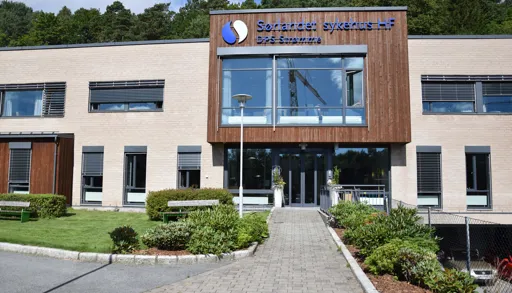
    En bygning med et skilt på forsiden

    Liane Ringvei 33

    Liane Ringvei 33

    PO Box 416, 4604 Kristiansand

    Transport

    You can reach our locations by public transport. Visit Agder public transport to find your route:akt.no

    You may be entitled to reimbursement of necessary expenses when travelling to and from your place of treatment.

    You should generally use public transport, and you will have to pay a co-payment. To get reimbursed for travel expenses you have paid, you must complete a travel reimbursement form and send it toPatient Travel.

  • Contact the Inpatient and Mobile Unit, Lister Inpatient Ward
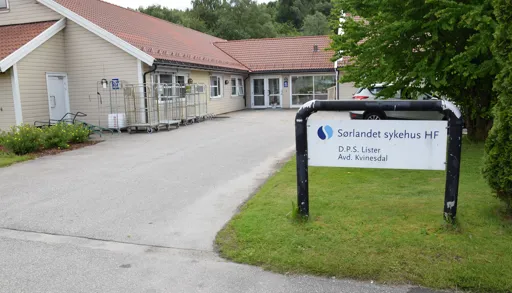
    Et skilt foran et hus

    Åmotsvegen 11

    Åmotsvegen 11

    4480 Kvinesdal

    Transport

    You can reach our locations by public transport. Visit Agder public transport to find your route:akt.no

    You may be entitled to reimbursement of necessary expenses when travelling to and from your place of treatment.

    You should generally use public transport, and you will have to pay a co-payment. To get reimbursed for travel expenses you have paid, you must complete a travel reimbursement form and send it toPatient transport.

    Practical information

    Is your appointment inconvenient? If you receive your appointment letter digitally via helsenorge.no, you can now send a message directly to the department you are due to visit if you need a new appointment time. You must be a registered user of Helsenorge to access this service.
    You can also contact the department where you have an appointment or call the switchboard at: 38 07 30 00
    ​

    Many patients and relatives wish to take photos/videos or blog during their time in hospital. This is of course permitted, as long as you respect the privacy of other patients and staff.

    Here is some good advice on using social media for patients and relatives:

    • Be considerate of others. You must have consent if you want to take photos or videos of patients or staff. All patients are entitled to privacy while in hospital.
    • Parents/guardians decide whether you may take photos of children or publish photos of their children online. Parents should consider what is best for the child. When the child turns 12, their views must be given considerable weight. When the child turns 15, they decide for themselves whether they are comfortable being photographed and whether the photos may be published.
    • Remember that staff must also give permission if you want to publish photos you have taken of them.
    • You should remove content you have published if the person concerned asks you to. If someone has posted photos of you online without your permission, you can ask them to delete them. If they do not comply, you can contact: www.slettmeg.no.

    Audio recording
    It is not illegal to record conversations in which you yourself take part for private use. However, publishing and sharing the recording requires consent from the person you are speaking with. Secretly recording conversations in which you do not take part is illegal.

    If you need an interpreter, you must inform the hospital well in advance of your appointment. Interpreter costs are covered by the health service.Helsenorge.no

    Patients not fluent in Norwegian are entitled to an interpreter.Helsenorge.no/interpreter

    All visitors can use the hospital’s free wireless internet.

    Look for HSO-Gjest on your network and follow the instructions to log in.

    If you cannot find the network, you are in an area that has not yet been covered.

TEST VERSION
Machine-translated copy of sshf.no for testing only. Not official information.